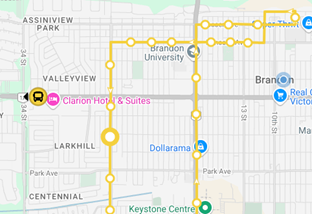
Select “Map” from the menu. Select the route you are interested in or select “Show All”.
BDN Transit App
BDN Transit is an app that is designed for you, the passenger, to help make the most of your time. You won’t have to guess when your bus will arrive - you’ll know. With BDN Transit, you can easily plan a trip, view schedules, or see where a bus is in real-time, directly from your smartphone or desktop computer. All the information you need to ride transit is at your fingertips.
The BDN Transit app is for fixed routes only.
How to Plan a Trip
Planning a trip is very easy. To begin, turn on your device's location services. BDN Transit will assess your location and find the stops and routes nearest to you.
If you have a destination in mind, you can enter the address or simply the name of a business, facility, or point of interest. BDN Transit will then provide you with multiple travel options. Select the one that works best for you, and you’ll get instructions on when to start walking to the bus stop, which bus to board, where to transfer buses and when to get off.
Where's My Bus?
Having the ability to watch when your bus is coming in real time is another benefit of BDN Transit.
With real-time data, you’ll be able to see where your bus is in real-time on a map. This eliminates the guessing game of, ‘where’s my bus?’ You will have the most accurate information possible in real-time, at any time. You’ll never have to worry about missing your bus again!
Adding a Location to Favourites
If there are certain places that you travel to on a regular basis, you can add them to your Favourites. The next time you search for a recurring route or stop, click on the star icon and BDN Transit will save this information for you.
Additionally, you can add a favourite location under the Favourites tab by entering an address, business, facility, point of interest, or by clicking on the map. The next time you want to go to a recurring route or stop, click on your Favourites tab and they will be at the top of your list, ready to go!
You also have the ability to rename your Favourites. So instead of always seeing a street name, you could name it "Home".
SMS (Text Message) Updates
BDN Transit also can send SMS messages*. If you text the bus stop code followed by a space, then the route number (direction if applicable) to 1-807-909-3377, you will receive texts with upcoming departure times. To get an update, you can reply to the agency text message with “R”.
*Standard carrier charges for text messaging may apply.
Frequently Asked Questions
How can I see where my bus is?
Why can't I see my bus on the map?
There could be a couple of reasons:
- The GPS equipment on the bus might not be working properly, so it's not sending location data.
- Your mobile device may be experiencing connectivity issues, possibly due to cell phone carrier outages (Rogers, TELUS, etc.) which will cause a loss of signal.
If the issue continues, try restarting your app or checking back in a few minutes.
How can I see what time the bus will be at the stop by my house?
Click on the map and the applicable route. Click on the bus stop of interest. The next 3 arrival times will appear along the bottom of the screen. If you wish to see more, click on “More”.
What does “Due” mean when I’m looking at the arrival times for a bus stop?
“Due” means the bus will be arriving to that stop momentarily or is already stopped there.
Does the BDN Transit app work for the Canada Packers midnight route?
No, the Canada Packers Midnight Route isn't included. BDN Transit only includes regular fixed routes.
What is the difference between the Morning loop vs Regular loop?
Some routes may have a toggle indicating if you are viewing the morning loop or regular loop. The morning loop runs until 10 a.m. on weekdays. If the incorrect loop is selected, the bus will still show on the map but the icon will be transparent.

Why is the bus showing transparent on the map?
Ensure you have the correct loop selected on the routes. See "What is the difference between the Morning loop vs Regular loop?" for more information.

Why is no departure information available?
Ensure you have the correct loop selected (morning loop vs. regular loop) or click “View Schedule”. Click “Show all Routes”

Do I have to figure out my route every time, or can I save the ones I use frequently?
You can save locations and routes into your "Favorites" section.
Where is the information coming from and how often is it updated?
BDN Transit integrates with the GPS software in the buses to receive and display real-time data about routes, stops, and vehicle locations. This information is updated every 20 seconds. If information is not updating, it could be due to a failure of equipment or a cellular carrier outage.
Why is there an icon with 3 lines beside the time of arrival?
These 3 lines indicate the time of arrival has been estimated based on the current location of the bus.

Why does the bus appear off route?
There are times when buses are required to go off route due to a detour caused by an accident or construction.